
Let’s be honest for a second. You’ve probably got, like, a hundred passwords floating around in your head, in a notes app, or—god forbid—on a sticky note under your keyboard. And despite every breach notification you’ve ever ignored, you still use “Sunshine2020!” for your banking app. I get it. Passwords are a pain. But here’s the thing: the era of the password is finally crumbling. And the replacement isn’t just another app—it’s something you can hold in your hand.
Hardware security keys and passkeys aren’t just tech-bro toys anymore. They’re becoming the backbone of personal data protection for regular folks—you know, people who just want to check their email without getting robbed. The shift is happening faster than most realize, and it’s worth understanding why this matters for your own digital life.
Wait, What’s the Difference Between a Passkey and a Security Key?
Sure, they sound similar. But they’re not the same thing, and honestly, the confusion is understandable. Let me break it down without the jargon soup.
A passkey is essentially a cryptographic pair of keys—one public, one private—that lives on your device. Think of it like a digital signature that’s unique to you and the website you’re visiting. It’s biometrics (your face or fingerprint) plus the device itself. No password to type, no phishing risk, because the private key never leaves your phone or laptop.
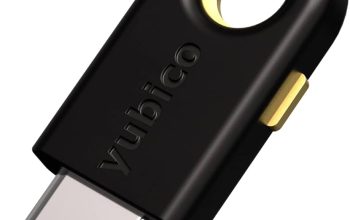
A hardware security key (like a YubiKey or Google Titan) is a physical device—usually USB or NFC—that plugs into your computer or taps your phone. It does something similar, but it’s a separate piece of hardware. Even if your phone is compromised, the key is a separate barrier. It’s like having a second lock on your door that requires a physical key you keep in your pocket.
Here’s the deal though: passkeys often use the same underlying technology (WebAuthn) as security keys, but they’re software-based and synced across devices. Security keys are hardware-based and intentionally not synced. That’s the tradeoff—convenience vs. absolute isolation.
Why Passwords Are Failing Us (Again and Again)
You’d think after a decade of data breaches, we’d have learned. But no. In 2024, the most common password was still “123456.” Seriously. And that’s why phishing attacks keep working. Hackers don’t need to break encryption—they just ask you for your password, and you hand it over.
Passwords have a fundamental flaw: they’re secrets that can be shared, stolen, or guessed. Multi-factor authentication (MFA) helped, but SMS codes can be intercepted. Even authenticator apps are vulnerable to real-time phishing—the attacker just relays your code to the real site while you think you’re logging in. It’s a mess.
That’s where hardware keys and passkeys shine. They don’t rely on secrets you can accidentally reveal. They rely on possession and biometrics. You can’t phish a physical key—unless you physically steal it, and even then, you need the fingerprint or PIN. It’s a whole different ballgame.
The Real-World Impact of Passkey Adoption
Passkeys have been rolling out across major platforms—Apple, Google, Microsoft, and even PayPal. The adoption curve is real. Here’s what’s happening on the ground:
- Phishing resistance: Passkeys are bound to the specific site’s domain. A fake site can’t ask for your passkey because the cryptographic challenge won’t match.
- Cross-device sync: Apple’s iCloud Keychain and Google’s Password Manager now sync passkeys across devices. Lose your phone? Your passkey is still in the cloud—though that raises its own questions.
- Biometric friction: Unlocking a passkey is just a FaceID scan or fingerprint tap. It’s faster than typing a 14-character password with symbols and numbers.
But here’s the catch—passkey adoption isn’t universal. Some sites still don’t support them, and that’s where hardware keys fill the gap. A hardware key works with older protocols too (like FIDO U2F), so it’s a more flexible tool for legacy systems.
Hardware Keys: The Paranoia Option (and That’s Okay)
Look, I’m not saying you need a hardware key if you’re just protecting your Instagram account. But for email, financial accounts, or crypto wallets? Absolutely. Hardware keys are for people who have something to lose—and honestly, that’s all of us now.
Consider this scenario: You’re traveling, you connect to hotel Wi-Fi, and you log into your bank. With a hardware key, even if the Wi-Fi is a honeypot set up by a hacker, they get nothing. No code to intercept, no password to steal. The key only responds to the legitimate bank’s challenge. It’s like whispering a secret in a crowded room—but only the person you trust can hear it.
| Feature | Passkey (Software) | Hardware Security Key |
|---|---|---|
| Cost | Free (built into OS) | $25–$70 per key |
| Phishing resistance | High | Very High |
| Cross-device sync | Yes (via cloud) | No (deliberate) |
| Physical theft risk | Low (biometric + device) | Medium (but PIN protected) |
| Best for | Everyday convenience | High-value accounts |
That table tells you the story. Passkeys are the everyday driver; hardware keys are the armored vehicle. You don’t need an armored vehicle for groceries, but you sure want one for the bank.
How to Start Using Passkeys Today (Without Losing Your Mind)
Alright, so you’re sold on the idea. But where do you actually start? It’s easier than you think, but there are a few bumps.
Step 1: Check Your Device Ecosystem
If you’re on an iPhone with iOS 17 or later, or a recent Android, you already have passkey support. Go to your Google Account or Apple ID settings and look for “Passkeys.” You’ll see a list of sites you’ve used. Enable it for the big ones—Google, Microsoft, Amazon, PayPal.
Step 2: Buy a Hardware Key for the Critical Stuff
Now, here’s the nuance. For your main email (the one that resets all your other passwords), get a hardware key. I’m talking about a YubiKey 5 Series or a Google Titan. Set it up as a second factor, but also set up a backup key and keep it in a safe place. Because if you lose your only key, you’re locked out—that’s the tradeoff for security.
One thing I’ve learned the hard way: register two keys. One on your keychain, one in a drawer. It’s like having a spare house key with a neighbor. You hope you never need it, but when you’re locked out at 2 AM, you’re grateful.
Step 3: Don’t Kill Your Passwords Just Yet
Here’s the awkward part. Passkeys are great, but not every site supports them. So you’ll still need passwords for a while. That’s fine. Use a password manager (like Bitwarden or 1Password) to generate unique passwords, and enable passkeys where available. Over time, the password manager will become a backup, not the primary method.
Honestly, the transition period is a bit messy. You’ll have some sites with passkeys, some with TOTP codes, and some that still ask for your mother’s maiden name. But the direction is clear—and it’s worth being early.
The Elephant in the Room: What If You Lose Your Passkey?
This is the fear that keeps people on passwords. “What if my phone dies and I can’t log in?” Well, that’s a valid concern, but it’s manageable. Here’s the thing—passkeys are synced to your cloud account. So if you lose your phone, you can still access your passkeys from a new device via your Apple ID or Google account recovery. That’s the good news.
The bad news? If someone gets your cloud account, they get your passkeys. That’s why you should enable a hardware key on your cloud account itself. It’s like putting a safe inside a vault. Redundant? Sure. But that’s the point.
For hardware keys, the recovery path is different. You set up backup codes when you register the key. Print those codes and store them somewhere—not in your email. Those codes are your last resort. And again, the spare key. I can’t stress that enough.
Why This Matters More Than You Think
We’re moving toward a passwordless future, but it’s not just about convenience. It’s about shifting the power dynamic. Right now, hackers exploit human error—phishing, social engineering, password reuse. Passkeys and hardware keys remove that vulnerability. They don’t rely on you being careful. They rely on you being present.
Think about it. The most secure system in the world is the one where you don’t have to remember anything, where the security is baked into the physics of the device. That’s what we’re getting. And honestly, it’s about time.
There’s a certain peace of mind that comes with knowing your bank account can’t be phished out from under you. It’s like the difference between a flimsy wooden door and a steel one with a deadbolt. Sure, a determined thief could still break in, but they’d move on to an easier target first.
So here’s my take: start with passkeys for your everyday accounts. Buy a hardware key for your email and financials. Set up recovery codes. And give yourself permission to stop memorizing passwords. The future isn’t coming—it’s already here, and it fits in your pocket.
The shift won’t be overnight, and there will be hiccups. But every time you skip typing a password and just tap your