
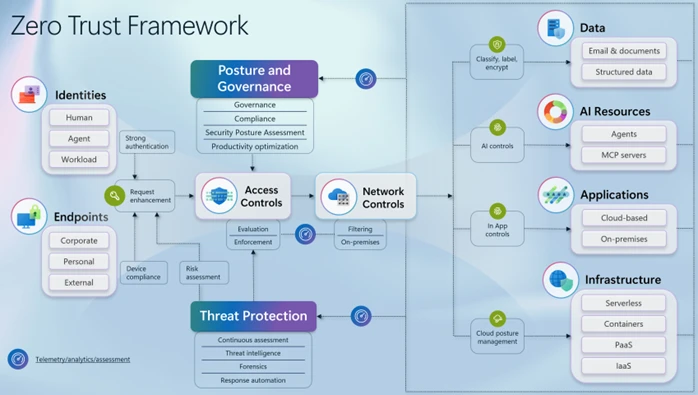
- Verify identity, always. Multi-factor authentication (MFA) is non-negotiable. Passwords alone are like locking your door and leaving the key under the mat.
- Assume breach. Design your network as if someone is already inside. Segment access so a compromised account can’t wander freely.
- Least privilege access. Give employees only the permissions they need to do their jobs. No more, no less.
- Continuous monitoring. Trust isn’t a one-time check. It’s ongoing — like a bouncer who keeps watching the crowd, not just the door.
- Micro-segmentation. Break your network into small zones. If one zone gets hit, the others stay safe.
None of this is rocket science. It’s more like good hygiene — consistent, boring, and incredibly effective.
How to Start Implementing Zero Trust (Without Blowing Your Budget)
You might be thinking, “This sounds expensive.” And sure, enterprise-grade zero trust platforms can cost a fortune. But small businesses can take a phased, pragmatic approach. Here’s a roadmap that won’t require a second mortgage.
1. Map Your Assets and Data
You can’t protect what you don’t know you have. List every device, app, and data repository. Who accesses what? Where does sensitive information live? This audit is tedious but eye-opening.
2. Roll Out MFA Everywhere
If you do only one thing, do this. Multi-factor authentication blocks the vast majority of credential-based attacks. It’s cheap, easy, and wildly effective. No excuses.
3. Adopt a Zero Trust Mindset for Access
Start denying by default. Instead of granting broad access and trimming later, grant nothing and add permissions as needed. It feels slower at first, but it prevents so many headaches down the road.
4. Segment Your Network
You don’t need fancy software for basic segmentation. Separate your guest Wi-Fi from your internal network. Keep financial systems on a different VLAN than marketing. Small steps add up.
5. Monitor and Log Everything
You can’t respond to what you can’t see. Set up logging for key systems and review alerts regularly. Even a simple SIEM (security information and event management) tool can help — or outsource monitoring to a managed service provider.
Tools and Technologies That Fit Small Business Budgets
Zero trust doesn’t require a single monolithic platform. In fact, a patchwork of affordable tools often works better for small teams. Here’s a quick comparison of categories and examples:
| Category | What It Does | Example Tools |
|---|---|---|
| Identity & Access Management | Manages logins, MFA, and permissions | Okta, JumpCloud, Microsoft Entra ID |
| Endpoint Security | Protects devices from malware and threats | CrowdStrike Falcon, SentinelOne |
| Network Segmentation | Divides network into secure zones | Ubiquiti, Cisco Meraki |
| Zero Trust Network Access (ZTNA) | Replaces VPNs with granular access | Cloudflare Access, Twingate |
| Monitoring & Analytics | Detects anomalies and logs activity | Datadog, Splunk, Graylog |
You don’t have to implement all of these at once. Pick the weakest link in your current setup and start there. Momentum matters more than perfection.
Common Pitfalls (and How to Dodge Them)
Zero trust isn’t a magic wand. It’s a journey. And like any journey, there are potholes. Here are a few mistakes I’ve seen small businesses make:
- Going too big, too fast. Trying to overhaul everything overnight leads to burnout and half-finished projects. Phase it.
- Ignoring user experience. If security makes work frustrating, employees will find workarounds. Balance is key.
- Forgetting about third parties. Vendors, contractors, and partners need zero trust too. Don’t leave backdoors open.
- Neglecting training. Technology alone won’t save you. Teach your team why zero trust matters and how to spot threats.
And hey — don’t beat yourself up if you stumble. Security is iterative. The goal is progress, not perfection.
The Bottom Line: Zero Trust Is a Mindset, Not a Product
At its heart, zero trust networking is about humility. It’s admitting that you can’t predict every threat, that insiders can be compromised, and that the perimeter is long gone. But instead of fear, it offers a framework — one that’s adaptable, scalable, and surprisingly achievable for small businesses.
You don’t need a massive IT budget or a team of certified experts. You need curiosity, consistency, and a willingness to question the old “trust but verify” mantra. In a world where a single phishing email can topple a company, zero trust isn’t paranoia. It’s prudence.
So start small. Pick one pillar. Add MFA. Segment your network. Monitor a little more. And remember: every step you take makes your business a harder target — and a safer place for your team, your customers, and your future.
Picture this: your small business has a cozy office, a handful of loyal employees, and a Wi-Fi network that’s basically an open door with a welcome mat. For years, that worked fine. You trusted everyone inside the building. But now half your team works from kitchen tables, your data lives in the cloud, and that “trusted” network? It’s more like a sieve than a fortress.
That’s where zero trust networking comes in. It sounds intimidating — like something a Fortune 500 company with a dedicated security team would deploy. But honestly? Small businesses might need it more than the big guys. Let’s break it down without the jargon headache.
What Exactly Is Zero Trust Networking?
Traditional security operated on a simple idea: trust everything inside the network, distrust everything outside. Firewalls, VPNs, and passwords created a perimeter. Once you were in, you were in.
Zero trust flips that. It says: trust nothing, verify everything. Every device, every user, every request has to prove it belongs — even if it’s sitting in your own office. Think of it like a hotel where every guest needs a key card for their room, the gym, the pool, and even the ice machine. No master keys. No free passes.
In practice, zero trust networking combines identity verification, device checks, least-privilege access, and continuous monitoring. It’s less a single product and more a philosophy — one that assumes breaches will happen and limits how far an attacker can roam.
Why Small Businesses Can’t Afford to Ignore It
Here’s the deal: cybercriminals love small businesses. Why? Because they’re often underprotected and overconfident. According to Verizon’s Data Breach Investigations Report, nearly 43% of breaches target small and mid-sized businesses. And the fallout isn’t pretty — the average cost of a breach for a small company can run into the hundreds of thousands.
But it’s not just about money. It’s about trust. Your customers, your partners, your reputation — all of it hangs in the balance. A single compromised laptop can become a gateway to your entire operation if you’re still relying on the old “castle and moat” approach.
And let’s be real: remote work isn’t going anywhere. The modern small business network is a patchwork of home offices, coffee shops, mobile devices, and cloud apps. Zero trust is built for that messy reality.
The Core Pillars of Zero Trust (Without the Buzzword Overload)
You don’t need a PhD to understand zero trust. It boils down to a few key principles. Sure, vendors love to dress it up, but here’s the plain-English version:
- Verify identity, always. Multi-factor authentication (MFA) is non-negotiable. Passwords alone are like locking your door and leaving the key under the mat.
- Assume breach. Design your network as if someone is already inside. Segment access so a compromised account can’t wander freely.
- Least privilege access. Give employees only the permissions they need to do their jobs. No more, no less.
- Continuous monitoring. Trust isn’t a one-time check. It’s ongoing — like a bouncer who keeps watching the crowd, not just the door.
- Micro-segmentation. Break your network into small zones. If one zone gets hit, the others stay safe.
None of this is rocket science. It’s more like good hygiene — consistent, boring, and incredibly effective.
How to Start Implementing Zero Trust (Without Blowing Your Budget)
You might be thinking, “This sounds expensive.” And sure, enterprise-grade zero trust platforms can cost a fortune. But small businesses can take a phased, pragmatic approach. Here’s a roadmap that won’t require a second mortgage.
1. Map Your Assets and Data
You can’t protect what you don’t know you have. List every device, app, and data repository. Who accesses what? Where does sensitive information live? This audit is tedious but eye-opening.
2. Roll Out MFA Everywhere
If you do only one thing, do this. Multi-factor authentication blocks the vast majority of credential-based attacks. It’s cheap, easy, and wildly effective. No excuses.
3. Adopt a Zero Trust Mindset for Access
Start denying by default. Instead of granting broad access and trimming later, grant nothing and add permissions as needed. It feels slower at first, but it prevents so many headaches down the road.
4. Segment Your Network
You don’t need fancy software for basic segmentation. Separate your guest Wi-Fi from your internal network. Keep financial systems on a different VLAN than marketing. Small steps add up.
5. Monitor and Log Everything
You can’t respond to what you can’t see. Set up logging for key systems and review alerts regularly. Even a simple SIEM (security information and event management) tool can help — or outsource monitoring to a managed service provider.
Tools and Technologies That Fit Small Business Budgets
Zero trust doesn’t require a single monolithic platform. In fact, a patchwork of affordable tools often works better for small teams. Here’s a quick comparison of categories and examples:
| Category | What It Does | Example Tools |
|---|---|---|
| Identity & Access Management | Manages logins, MFA, and permissions | Okta, JumpCloud, Microsoft Entra ID |
| Endpoint Security | Protects devices from malware and threats | CrowdStrike Falcon, SentinelOne |
| Network Segmentation | Divides network into secure zones | Ubiquiti, Cisco Meraki |
| Zero Trust Network Access (ZTNA) | Replaces VPNs with granular access | Cloudflare Access, Twingate |
| Monitoring & Analytics | Detects anomalies and logs activity | Datadog, Splunk, Graylog |
You don’t have to implement all of these at once. Pick the weakest link in your current setup and start there. Momentum matters more than perfection.
Common Pitfalls (and How to Dodge Them)
Zero trust isn’t a magic wand. It’s a journey. And like any journey, there are potholes. Here are a few mistakes I’ve seen small businesses make:
- Going too big, too fast. Trying to overhaul everything overnight leads to burnout and half-finished projects. Phase it.
- Ignoring user experience. If security makes work frustrating, employees will find workarounds. Balance is key.
- Forgetting about third parties. Vendors, contractors, and partners need zero trust too. Don’t leave backdoors open.
- Neglecting training. Technology alone won’t save you. Teach your team why zero trust matters and how to spot threats.
And hey — don’t beat yourself up if you stumble. Security is iterative. The goal is progress, not perfection.
The Bottom Line: Zero Trust Is a Mindset, Not a Product
At its heart, zero trust networking is about humility. It’s admitting that you can’t predict every threat, that insiders can be compromised, and that the perimeter is long gone. But instead of fear, it offers a framework — one that’s adaptable, scalable, and surprisingly achievable for small businesses.
You don’t need a massive IT budget or a team of certified experts. You need curiosity, consistency, and a willingness to question the old “trust but verify” mantra. In a world where a single phishing email can topple a company, zero trust isn’t paranoia. It’s prudence.
So start small. Pick one pillar. Add MFA. Segment your network. Monitor a little more. And remember: every step you take makes your business a harder target — and a safer place for your team, your customers, and your future.