Let’s be honest. The standard mouse and keyboard are like a chef trying to cook a five-course meal with just a paring knife and a single pot. Sure, you can do it, but it’s a grind. For creative professionals and streamers, the tools you use aren’t just accessories; they’re extensions of your intent, your workflow, and frankly, your sanity.
That’s where niche input devices come in. These aren’t your average peripherals. They’re specialized, sometimes quirky, tools designed to solve specific problems—to shave seconds off a repetitive task, to unlock a new level of control, or to simply make the marathon of content creation less of a pain in the… wrist.
For the Digital Artist & Photo Editor: Precision is Everything
If you’re deep in Photoshop, Illustrator, or DaVinci Resolve, you know the mouse is a blunt instrument. Here’s where niche gear truly shines.
Graphics Tablets & Pen Displays
Well, this is the classic, but the tech has evolved. It’s not just about drawing anymore. For photo editors, the pressure-sensitive pen is a godsend for masking and dodging & burning—it feels organic. The real niche players now are the tablets with programmable touch rings and express keys. You can map your most-used brush sizes, zoom actions, or layer adjustments right onto the device. It keeps you in the flow, eyes on the screen, not hunting for keyboard shortcuts.
Editing Dials & Controllers
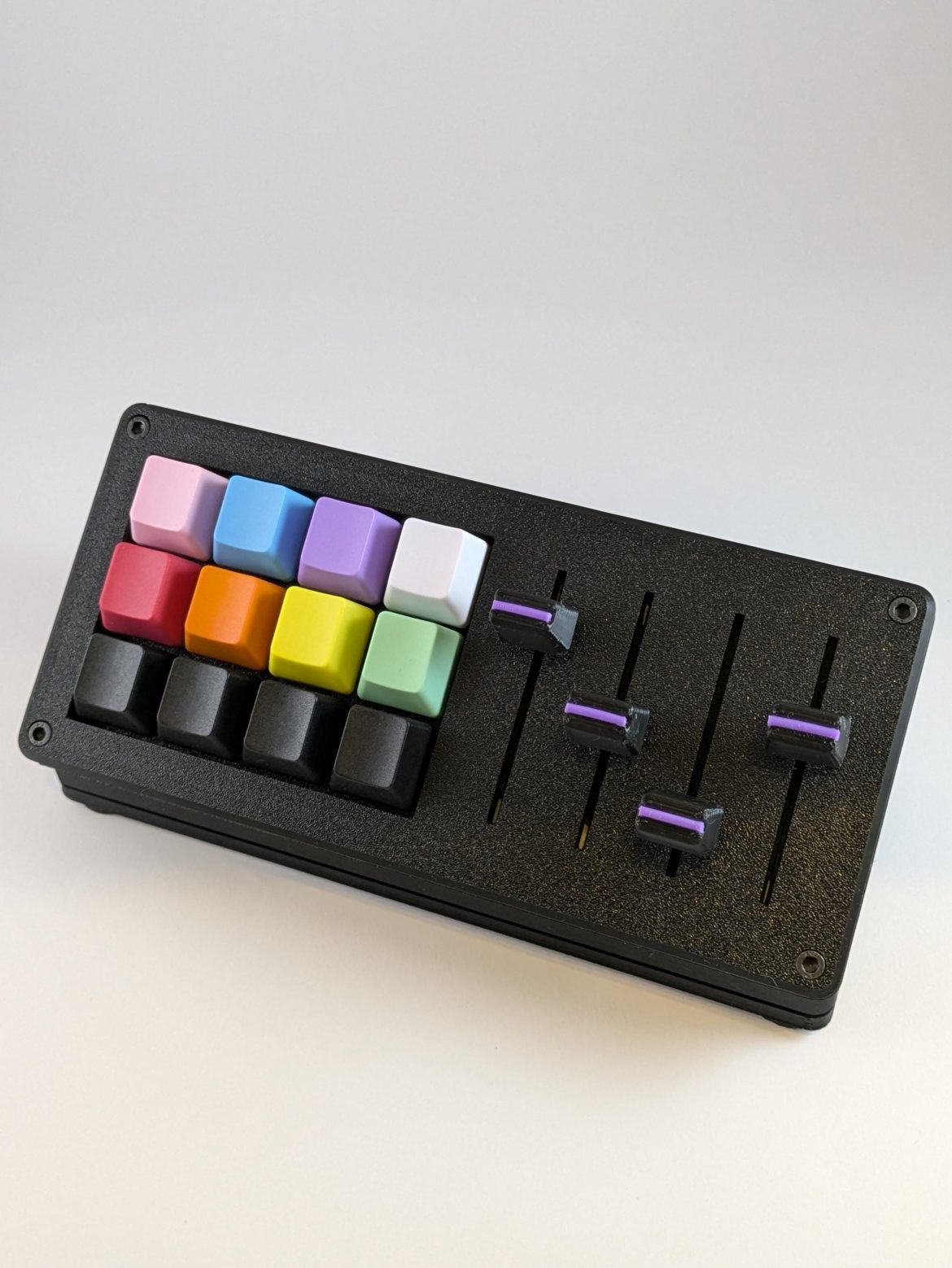
This is where things get interesting. Imagine a dedicated, tactile dial just for scrubbing through your timeline. Or a console with multiple knobs for adjusting color sliders in real-time. Devices like the Loupedeck+ or TourBox are built for this. They turn complex, multi-step adjustments into a single twist or press. It’s like the difference between adjusting a car’s radio with a touchscreen versus a physical knob—you can do it without looking. The muscle memory you build is a massive workflow accelerator.
For the Streamer & Video Producer: Command and Control On Air
Streaming is a performance, and you’re the director, sound engineer, and star all at once. Juggling scenes, audio sources, lighting, and chat with a mouse? It’s a recipe for dead air or a missed donation alert.
Stream Decks: The Obvious Game-Changer
Okay, the Elgato Stream Deck isn’t so “niche” anymore, but its ecosystem is. It’s the Swiss Army knife for streamers. But the niche part? It’s how you use it. Beyond scene switching, pros integrate it with plugin controls for audio filters (like a one-touch “mute my cough” button), lighting scene recalls, and even hardware control for their cameras. The customizable icons provide instant visual feedback—no more wondering if your “BRB” scene is actually live.
Advanced Audio Controllers
For the streamer serious about sound, a simple USB mic isn’t the endgame. Enter the audio interface mixer combo. Devices like the GoXLR Mini offer physical faders for your game audio, chat, music, and mic—allowing for real-time, smooth adjustments that a mouse click can’t match. The tactile feel of pulling down a fader when game audio gets too loud is instantaneous and precise. It’s professional-grade control that viewers can *hear* in your production quality.
The Hidden Gems: Inputs You Might Not Have Considered
Beyond the big categories, there are some wonderfully specific tools solving very real pain points.
- 3D Connexion SpaceMouse: For 3D modelers and CAD users, this is pure magic. It’s a puck you nudge and twist to fly around a 3D model in six degrees of freedom. It feels like you’re physically holding the object. The learning curve is steep, but once it clicks, navigating with a regular mouse feels like trying to walk through molasses.
- Foot Pedals & Switches: Seriously! A USB foot pedal can be mapped to push-to-talk, a push-to-mute, or a “hold to preview” scene button. It frees up your hands for drawing, gaming, or typing. It’s a tiny addition that can dramatically reduce clutter in your manual workflow.
- Trackballs & Vertical Mice: Born from ergonomics, these have become niche favorites. A trackball, like those from Kensington, lets you control the cursor with your thumb while your arm stays perfectly still—great for editors making precise, small movements for hours. It’s a different kind of precision, one that can save you from repetitive strain.
Choosing Your Weapon: A Quick Considerations Table
| Device Type | Best For | Key Benefit | Consideration |
| Editing Dials (Loupedeck, TourBox) | Photo/Video Editors, Musicians | Tactile, faster parameter control | Software compatibility is crucial |
| Stream Deck & Clones | Streamers, Podcasters, Presenters | Macro automation & visual feedback | Requires setup time to unlock value |
| Advanced Audio Mixers | Streamers, Voice-Over Artists | Real-time, hands-on audio mixing | Can be overkill for simple setups |
| Graphics Tablet (with buttons) | Digital Artists, Retouchers | Natural drawing feel & shortcut access | Pen display vs. non-display is a big price jump |
| Ergonomic (Trackball/Vertical Mouse) | Anyone with wrist/fatigue issues | Health & long-term comfort | Adjustment period can be frustrating |
Here’s the deal: you don’t need all of this. In fact, buying too much at once can overwhelm your process. The smart move? Identify the one bottleneck in your workflow that causes the most friction or fatigue. Is it switching scenes? Is it adjusting brush size a hundred times an hour? Is it your aching shoulder after a long edit?
Start there. A single, well-chosen niche device can feel like learning a secret shortcut—a way to work that’s not just faster, but more intuitive, more enjoyable. It turns the interface between your ideas and the digital canvas from a transaction into a conversation. And that, honestly, is where the real magic happens.